Minecraft

If you want to make your world more challenging, enabling Hardcore mode is one of the best ways to do it. The difficulty increases and the consequences change completely: here, death actually matters. Many people think Hardcore can only be selected when creating a new world, but you can also enable it on an existing one. In this guide, you'll learn how to enable Hardcore mode step by step.
Hardcore turns a normal game into an experience where every decision matters.
- New world → Enable Hardcore when creating the world
- Existing world → Enable Hardcore in your server settings or
server.properties - Create a backup before making changes
- Restart the server and verify everything works correctly
What changes in Hardcore mode
Hardcore uses permanent hard difficulty and adds one main rule:
- You only have one life
When you die:
- You enter spectator mode (Java)
- You cannot respawn normally
This makes every mistake have real consequences.
How to create a new Hardcore world
If you haven't created your world yet:
- Click Create New World
- Enable Hardcore
- Create the world
Done.
How to enable Hardcore on an existing world
1. Stop the server
Before modifying anything:
- Completely stop the server
This prevents data corruption.
2. Create a backup
Before changing configurations:
- Download your world
- Save a copy
Never make important changes without a backup.
3. Enable Hardcore mode
Many hosting providers allow you to enable Hardcore directly from the server settings.
If you're using Dathost, the process is even easier. Simply go to Settings → Gameplay and enable the Hardcore option:
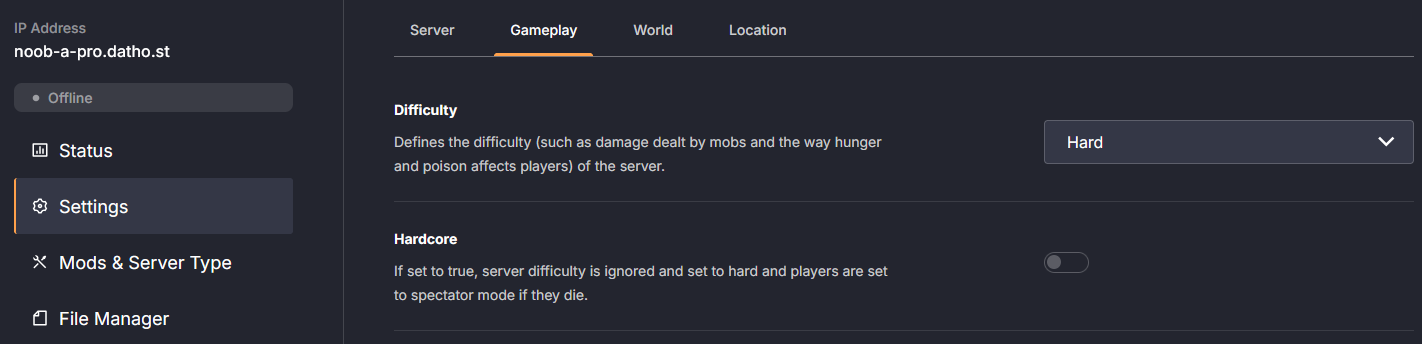
This automatically applies Hardcore mode and configures everything correctly without needing to manually edit files.
If you're using a server.properties file instead, look for:
hardcore=true
Save the changes and restart the server.
4. Check that everything works
Join the world and verify:
- Hardcore mode is enabled
- The difficulty is correct
- Everything loads properly
FAQ
No. Your world and items remain unchanged.
Yes, by changing the settings again.
Yes, as long as the mods are compatible with your Minecraft version.