Minecraft

If you have a Minecraft server, you’ve probably noticed lag spikes when exploring new areas. This happens because the server has to generate chunks in real time, which consumes a lot of resources.This is where Chunky comes in.
Chunky is a tool that allows you to pre-generate your world, avoiding those lag spikes and improving overall server performance.
In this guide, you’ll learn how to use Chunky step by step so your server runs much more smoothly.
- Chunky pre-generates world chunks
- Reduces lag while exploring
- Improves overall server performance
- Easy to use with commands:
- /chunky radius 500
- /chunky start
- /chunky progress
- /chunky pause
- /chunky cancel
What is Chunky and what is it for
Chunky is a plugin/mod that allows you to generate chunks in advance in your world.
Instead of generating the map while you play, it does it beforehand, avoiding load spikes.
This improves stability and makes the server run much more consistently.
How to install Chunky
Before using Chunky, you need to install it on your server.
The process is simple:
- Download the version compatible with your server (Paper, Fabric or Forge)
- Upload the file to your server (plugins or mods folder)
- Restart the server
Once installed, you can start using it with commands.
How to use Chunky step by step
1. Select the world
Make sure you are in the world you want to generate.
2. Define the area
Use this command to set the radius:
/chunky radius 500
This will generate chunks in a radius of 500 blocks from the center.
3. Start the generation
/chunky start
The process will start automatically.
4. Check progress
You will see a progress bar at the top of the screen showing how much has been generated and an estimated time remaining.
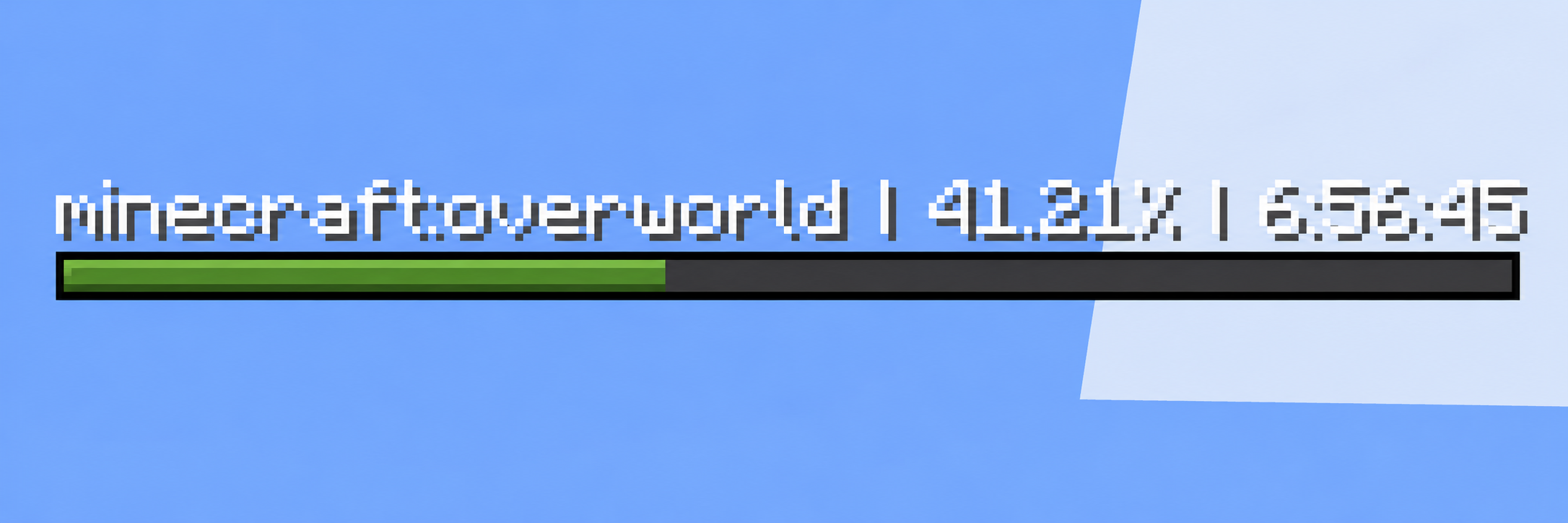
In addition, you can use this command to check it in the chat:
/chunky progress
5. Pause or cancel
/chunky pause
/chunky cancel
Important tips
- Don’t use a very large radius from the start
- Run Chunky when few players are online
- Monitor performance while generating
- It’s better to do it in phases
FAQ
Yes. By generating the world in advance, it removes load spikes when exploring new areas.
It depends on your server, but it’s recommended to start with moderate values (300–500) and increase gradually.
Yes, but it’s not recommended. It’s best to run it when few or no players are connected to avoid lag.